Magenta direction, built from the supplied reference: its composition, photo-card treatment, glass chips, segmented controls, name-and-age typography and floating action bar, translated into MatchySpot. Dark is the reference appearance; light is the same product in daylight. Both follow the phone.
Reading this as: the reference's visual language, executed with product discipline, carrying MatchySpot's identity. Photography fills the frame. One hot magenta is spent only on the primary action and active state. A single gold micro-label sits above the name, and it only ever appears over a photograph.
Reference, then MatchySpot
Gold star PREMIUM label above the name›Gold mark + 82% MATCH, the compatibility line
Name bold, age beside it in a lighter grey weight›Kept exactly. Camille 27, Noé 29
Three glass fact chips (km, kg, cm)›Distance, interests in common, intention
More info chip grid›Interests, shared ones filled magenta
Wide pill, small circle, wide pink pill›Pass, Flash, Like. Flash is the raised circle
Story progress line above the photo›Five photo segments, tap to advance
Archive photo grid›Your photos, with an add tile at 80%
Uppercase segmented pill in the header›For you / Nearby, and the Events timeframe
One deliberate change: the reference sets emoji inside its chips. Every chip here uses a drawn icon from one family instead, so the chips stay sharp at 12px and render identically on every device.
Explore, after TheFork
Search, then where, when and how many›Search with a filter count, over one bar for place, time and party size
Featured restaurant carousel›Photo cards; the gold label counts people you may match who go there
Discount badge on the photo›A glass offer pill, never magenta
Bookable time slots with offers›Tables tonight, the chosen slot in magenta tint
Editorial collections›First-date spots, rooftops, quiet cafés, late bars
Map and list toggle›Its own Map tab; rating pins on a two-tone map
Explore is the first of six tabs (Explore, Discover, Map, Events, Chat, Profile) and the screen the app opens on. Venues come first; people stay one tab away in Discover. Every venue is read against tonight, 20:00, for two, so what you see is what you can actually book.
Colour
Ink black #0A0A0C, dark ground
Raised #1E1E24, chips, fields
Magenta #FF2D87, the signature
Paper #F6F5F7, light ground
Raised, light #ECEBEF, chips, fields
Gold #F5C451, over photos only
Magenta is always paired with ink-black content, which holds 5.6:1 in both appearances, so the fill is byte-identical in light and dark. As text it deepens to #CF0060 on paper. Gold is governed by one rule: it appears only over photography, where the scrim guarantees its contrast.
Type
Camille 27Name 40 / 800, age 500
Rooftop SocialCard title 28 / 800
82% matchLabel 11 / 800 / .14em
Match preferencesSection 17 / 800
Architect by day, amateur baker by night.Body 14.5 / 500 / 1.6
Manrope only, hierarchy carried by weight and colour rather than by a second family. The reference's signature move is kept intact: the name at 800 in white with the age beside it at 500 in 66% white, so age reads as a detail instead of a headline.
Structure
Photography is the frame. The Discover card is inset 16px and 30px round, and the photo runs to its edges. Nothing sits on a face: content lives in the lower third, where the scrim has already darkened the image.
Glass belongs to photographs. Blurred dark pills and circles are used only over an image. Away from photography, chips are solid raised surfaces that flip with the appearance.
Everything interactive is a pill. Circles for icon-only controls, pills for anything with a label, 26 to 30px radius for media, 18px for fields and thumbnails.
Components
82% match2 km awayJazzCeramics
Pass, Flash, Like
SharedInterestoff photography
80%
Motion
Springs throughout, critically damped at a 0.35s response, always starting from the current on-screen value so a gesture can interrupt an animation. Controls scale to 0.96 on pointer-down. The Discover card tracks the finger one to one, and release velocity decides Pass or Like.
Flash is the one interaction with a flourish. Press and hold and the raised circle fills magenta from its centre over 300ms, the bolt flips to ink, a light haptic fires, and the gold match label pulses once. Match: the ring in the mark slides into the disc and the whole label turns magenta for a beat. The splash plays that same motion at full scale, so the first thing you ever see is the brand idea.
9:41
MatchySpot
Find your spot. Meet your match.
01 SplashThe reference's magenta glow, brought inside the product: a soft radial bloom on ink black, the mark centred, and a thin magenta loading line echoing the story progress bar used on Discover. The disc and the ring arrive from opposite sides and settle overlapping. Click the phone to replay.
02 LoginThe reference's header pattern, a circular button beside a centred title, then the brand, a heavy display heading and two 18px fields with leading icons. One magenta pill carries the primary action; Apple and Google sit below as raised secondaries. The focused field shows the system's only focus treatment, a magenta edge.
03 ExploreThe app opens here. TheFork's home, read through MatchySpot: search with a filter count, then one bar holding where, when and for how many, so every venue below is read against a table that exists tonight at 20:00 for two. Categories are raised chips. Featured places are full photo cards: the gold label counts the people you may match who go there, the offer and save controls are glass, and Book is the one magenta action. Near you is a swipeable row of compact cards; Tables tonight shows bookable slots with their offer underneath, the chosen one in magenta tint; Collections and Happening nearby close the page. Map and Chat have their own tabs, so nothing floats over the list. Scrolls inside the phone, rows swipe sideways.
GammarthLa MarsaSidi Bou Said124.64.74.74.54.8
9:41
AllRestaurantsCafésBarsRooftops
Le Golfe Bleu
Mediterranean · La Marsa
4.8(342) · 0.8 km · $$$
Maison Jasmin
Tunisian · Sidi Bou Said
4.7(518) · 1.6 km · $$
04 MapThe Map tab. A quiet two-tone map drawn only from the appearance's own surfaces, plus a road and a water token, so it flips with light and dark like everything else. Venues are rating pins; the selected one turns magenta and grows a tail, and dense streets collapse into an ink count. Search and categories float on solid surfaces, because there is no photograph to put glass over. Below, the selected venue as a swipeable card with tonight's slots, and a button to centre on you.
9:41
For youNearby
82% match
Camille 27
Paris 11e, France
2 km4 sharedSerious
Film photographyJazzCookingRunningCeramics
05 DiscoverThe reference frame, one to one: five photo segments, a glass circle either side of an uppercase segmented pill, and a photograph that runs to the edges of a 30px card. In the lower third, gold compatibility, then the name at 40px with the age beside it in a lighter weight, location, three glass fact pills, and the interests with the four you share filled magenta. Below the card the action bar keeps the reference's proportions: a wide Pass pill, a raised Flash circle, a wide magenta Like.
06 EventsThe same grammar, applied to places instead of people. Tonight's event is a full photo card carrying the gold label, the title at 28px, location, glass pills for time and attendance, and the faces going, with a magenta ring on the three you may match with. The rest of the week uses the reference's two-column photo grid, each tile carrying its own glass match badge. Scrolls inside the phone.
07 ChatNew matches come first, as a row of rings: magenta while unopened, grey once seen, with a raised bolt on whoever sent a Flash. Your likes sit at the head of the row, counted in gold over a blurred photo. Below, conversations: unread names in full ink with a magenta count and time, typing shown in magenta, read receipts on what you sent. Venues travel into chat, so a place found in Explore turns into a plan here.
Hi Noé! The sourdough claim on your profile. Is it real?
Very real. I bake every Sunday, it's not up for debate.
Today
Dinner tonight? This place has a table for two at 20:00
−30% on food
Le Golfe Bleu
Mediterranean · 0.8 km
Tonight, 20:002
Le Golfe Bleu! I go there all the time. Yes, 20:00 works
Table booked for 2, tonight at 20:00
See you at 8, I'll be the one by the window
Suggest a placeEvents tonightSend a Flash
08 ConversationCamille, from Discover. Their messages sit on raised grey and yours on ink, so magenta stays reserved for Send and for the booking. A venue shared from Explore arrives as a photo card carrying tonight's time and party size; once you both agree, the booking lands in the thread as a magenta-tint confirmation. Quick actions above the composer suggest a place, tonight's events or a Flash.
Architect by day, amateur baker by night. I will absolutely bring sourdough to a first date and pretend it was no trouble.
Looking for someone who has opinions about bread, buildings, or both.
Interests
ArchitectureBakingJazzCyclingCinemaCooking
Match preferences
Women25 to 34Up to 15 kmSomething serious2 shared interests
Photos
09 ProfileThe reference's detail screen, read back as your own identity. The gold label that said PREMIUM now says how complete you are; your name and age keep the same treatment they get in Discover; the three glass pills carry your quick facts. Below, the reference's section rhythm: About, Interests, Match preferences as magenta-tinted chips, and the Archive grid as your photos with an add tile standing in for the two you are missing. Edit profile floats as a magenta pill. Scrolls inside the phone.
Behind the buttons
What opens from the controls above. Click the where-and-when bar or the filter button in Explore, the Like button in Discover, the three dots in a conversation, or the gear on Profile to jump to its screen.
When and who
Where
Near meLa MarsaSidi Bou SaidGammarthLac 2Medina
WhenTuesday 27 October
Time
Guests
2Just the two of you
10 Explore, when and whoTapping the place, day or party size in Explore opens one sheet for all three, over the dimmed list. Neighbourhood chips with Near me first, a week of days, the evening's times as the same slots used for booking, and a stepper for guests that defaults to two. The magenta button already says how many places have a table for that choice, so the answer comes before the tap.
11 Explore, filtersThe filter button's sheet, nearly full height. Sort as a segmented control, price and rating as chips, distance as a slider, then Good for, the filter only MatchySpot has: first date, quiet, terrace, live music, late night. Offers only, Open now and Bookable tonight are switches. The two filters changed from their defaults, price and offers, are the 2 on the filter button; Reset and the result count bracket the sheet.
CamilleMatched yesterday · 82% match
View profile
Shared places1
Mute notifications
Unmatch
Report
Block
Reporting and blocking are private. Camille isn't told.
12 Conversation, optionsThe three dots in a conversation. An action sheet over the dimmed chat: who you are talking to, then View profile, the places you have shared, and Mute. Unmatch, Report and Block sit in their own group, kept in ink rather than magenta so magenta never means danger, with a line saying Camille isn't told. Cancel stands apart.
13 SettingsThe gear on Profile. Your account first, then grouped rows: discovery preferences with their current values, notifications as switches, appearance as a segmented control, privacy and safety with Incognito, and support. Log out is a raised button; Delete account is quiet text below it, never a coloured one. Scrolls inside the phone.
9:41
82% match
It's a match
You and Camille liked each other.
Film photographyJazzCooking
You both savedLe Golfe BleuTable for 2 tonight, 20:00
14 MatchWhat a Like becomes when it is mutual. The brand idea at full size: your photo ringed in magenta as the disc, theirs ringed in white as the ring, sliding together until they overlap, the same motion as the splash. Camille's photo, blurred, fills the screen, so gold and glass are allowed: the gold line carries the compatibility, glass chips show the interests you share, and a glass card offers a place you have both saved, with tonight's table. One magenta action, Send a message; Keep exploring is glass. Click the phone to replay, or the Like button on Discover to jump here.
Venues and events
A venue or an event, then the booking. You can book for yourself, for two, or with one of your matches, who gets the invite in chat. Click Book on Le Golfe Bleu in Explore or Join on Rooftop Social in Events to start.
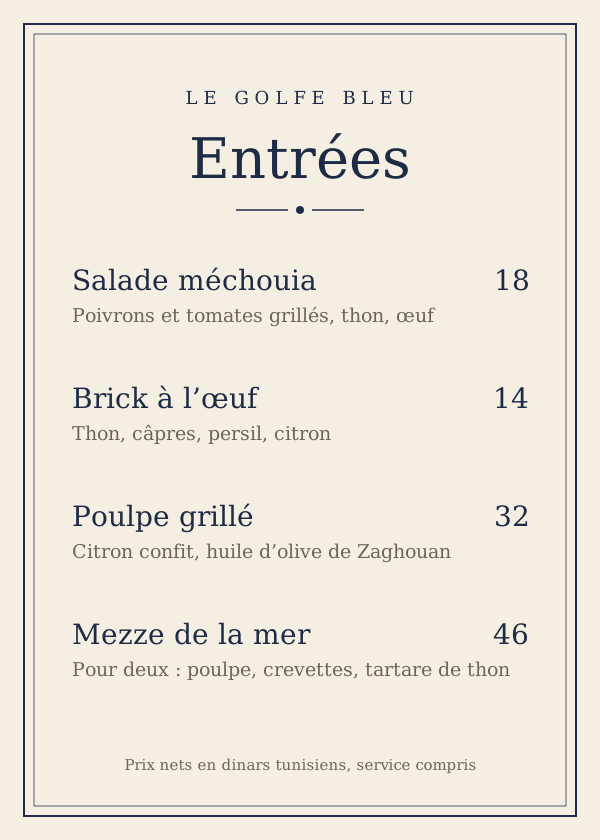
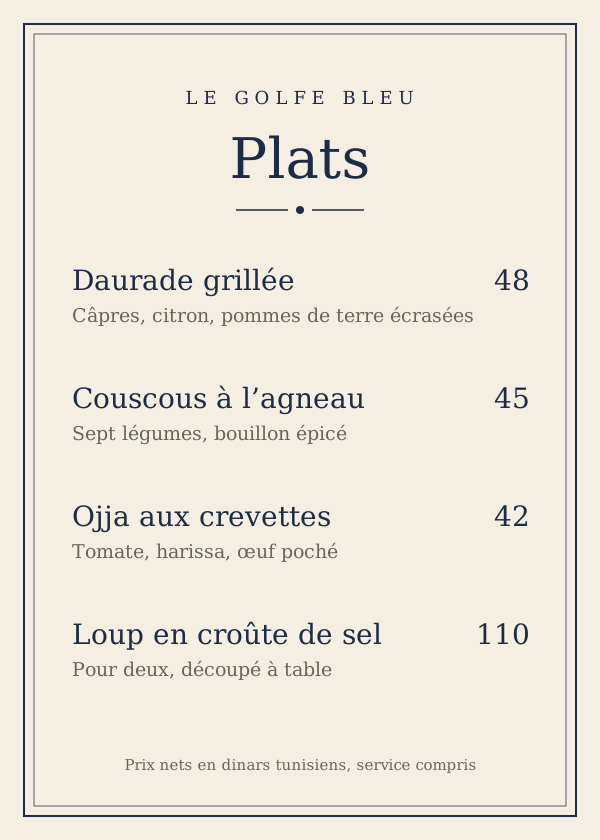
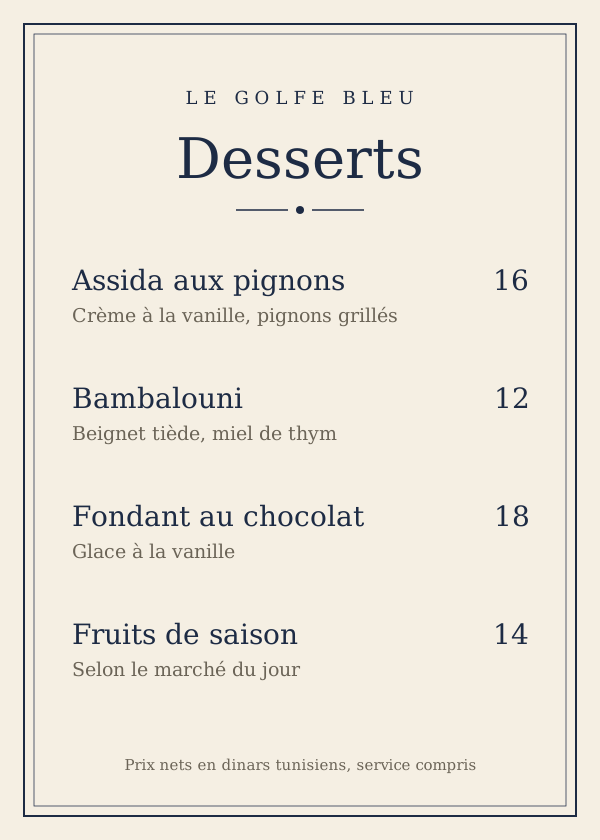
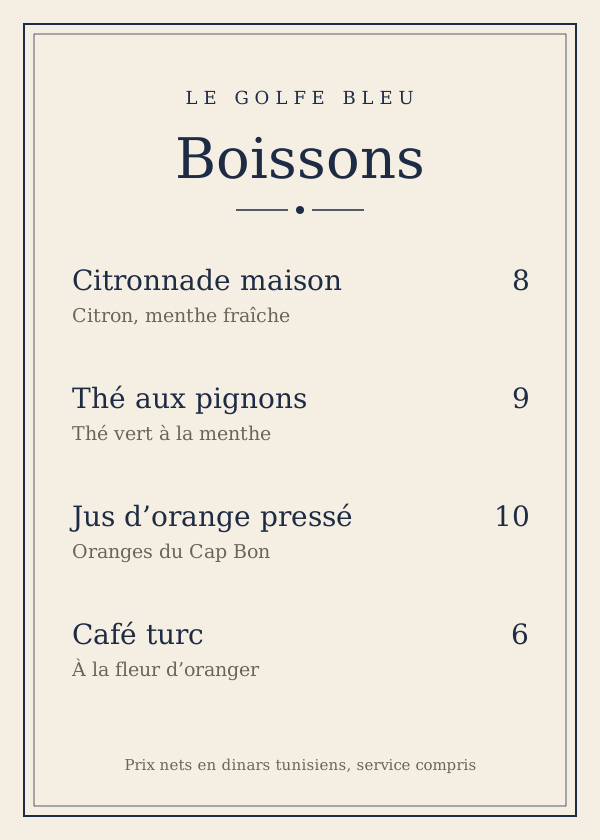
15 VenueKept to what decides a booking. The photos are a carousel that runs to the top, with dots underneath and glass back, share and save; swipe it, or click it for the next photo. Then the name, cuisine, area and price, the rating and closing time, and the people you may match who go here. Tonight's slots come next, so the common case is one tap: any slot, Other days or Book a table opens the booking. The offer comes next, then the menu as the venue's own pages, a carousel of images: Entrées, Plats, Desserts, Boissons, each large enough to read, with the page count in glass. Swipe through them; in the app a tap opens a page full screen with pinch to zoom. Venues upload their menu as photos, so it is always the real one. A short About, Good for and the address close the page. The bar at the bottom keeps the chosen time and Book a table in reach while you scroll.
16 Book a tableOne sheet over the dimmed venue. Who’s coming comes first, as three equal choices: Just me for one, For two for you and a guest who isn't on MatchySpot, and With a match. With a match opens a row of your matches; the chosen one is ringed in magenta with a tick and gets the invite in your chat. Then the day and the time, offers shown on the slots that carry them. The button repeats the time and party size, so nothing is booked by surprise.
9:41
Your table
Table booked
Le Golfe Bleu
Route de la Corniche, La Marsa
DateTue 27 Oct
Time20:00
Guests2, with Camille
Offer−30% on food
MS-48213Show it at the door
17 BookedA ticket, so it reads as a real reservation. The venue photo carries Table booked in gold; under it the name and address, then date, time, guests and the offer in a grid. A tear-off line separates the code to show at the door, a QR code with the booking number. Message Camille is the one magenta action and Add to calendar a plain link; booked for one or two, Done takes the place of Message Camille. The confirmation email goes out at the same moment.
35 DT a personOne drink included, paid at the door
About
An easy evening to meet people: a welcome drink, a DJ from 21:00 and a view over the bay. Come alone, it is made for that.
Who’s coming?
35 DT1 place, paid at the door
18 EventThe same page as a venue, with the event's facts in one group: when, where with directions, and the price. The faces going come before the description, as on the Events card. Who’s coming sits on the page itself, because an event has no table to choose: Just me, For two or With a match, which opens the same match row as the booking sheet. The bar shows the total for the places chosen; Book my spot confirms and sends the ticket by email, click it to see it.
Create account
Sign-up, one question per screen, in French. Créer mon compte on the password step sends a code by email; once it is entered, four profile steps lead to Bienvenue. Click Create account on Login to start, Continuer to move forward, and C’est parti ! at the end to land on Explore.
9:41
1/5
Comment t’appelles-tu ?
C’est ce prénom qui s’affichera sur ton profil.
19 Sign-up, nameStep one of five. One question per screen, a segmented progress line in magenta, back on the left, the step count on the right. First name, then Je suis… as three equal choices, the chosen one in magenta tint. Continuer is the one magenta action and sits in the same place on every step.
9:41
2/5
Quelle est ta date de naissance ?
Seul ton âge sera visible sur ton profil.
JourMoisAnnée
Tu as 29 ans
MatchySpot est réservé aux 18 ans et plus.
20 Sign-up, birth dateDay, month and year as three scroll wheels that snap to one row, the chosen row in a magenta-tint band and the rest fading out at the edges. The age underneath updates as you scroll, and only the age is shown on the profile. Under 18 stops here, with the reason in plain words. The wheels scroll in this document too.
9:41
3/5
Choisis tes meilleures photos
Plus tu ajoutes de photos, plus ton profil attire l’attention !
Principale
2 photos sur 6
21 Sign-up, photosThe main photo takes a double slot and is labelled Principale; the other five slots are the magenta-tint add tiles from Profile. The count says how many are left. Continuer works from one photo, and the line under the title gives the reason to add more.
9:41
4/5
Quelle est ton adresse email ?
Elle sert à te connecter et à récupérer ton compte.
22 Sign-up, emailOne field with the email keyboard. The newsletter box starts unchecked: marketing email needs an explicit yes, so the person ticks it themselves. Checked, it fills magenta with an ink tick.
9:41
5/5
Choisis un mot de passe
Tu l’utiliseras avec ton email pour te connecter.
Afficher
8 caractères minimum
Une majuscule
Un chiffre
Afficher
Les deux mots de passe sont identiques
23 Sign-up, passwordThe password, with three rules that tick in magenta as they are met, then the same password again. As soon as the second one matches, a magenta-tint block confirms it right under the field; while they differ, the block reads Les mots de passe ne correspondent pas and the button stays inactive. Both fields can be shown or hidden. This step submits, so the button says Créer mon compte instead of Continuer.
9:41
5/5
Vérifie ta boîte mail
On a envoyé un code à 6 chiffres à noe@exemple.fr. Il est valable 15 minutes.
4829
Renvoyer le code dans 0:42
Voir l’email envoyé
24 Sign-up, email codeCréer mon compte sends a six-digit code; the account only opens once the address is proven. Six boxes, the next one ringed in magenta, and the code pastes or fills from the keyboard's suggestion in one go. Resend unlocks after a countdown, and a wrong address is one tap back to the email step. The email itself is in the Emails section below; click its line to jump there.
9:41
1/4
Ton profil
Ta situation amoureuse
Pour te présenter des personnes qui cherchent la même chose que toi.
Statut
Jamais marié(e)Divorcé(e)Veuf / VeuveJe préfère ne pas le dire
Je suis ici pour
Intéressé(e) par
HommeFemmeLes deux
25 Profile, love lifeThe account now exists, so the profile steps get their own progress line of four and no back button on the first. Short answers are chips, one tap each; Je suis ici pour has longer answers, so they are full-width radio cards, the chosen one in magenta tint with a magenta ring. Your reference opened a separate page per question; here every answer is on the screen, so a section takes a few taps instead of two per question.
9:41
2/4
Ton profil
Ta personnalité
Ce qui te rend unique. Tout s’affichera sur ton profil.
EssentielImportantPas indispensableJe ne sais pas encore
Je veux des enfants
OuiUn jour peut-êtreNonJ’en ai déjà
Ma nationalité
Française
26 Profile, personalitySix questions, scrolling inside the phone. The star sign is already filled in from the birth date, so it is a confirmation rather than a question; tapping it opens the full list. Nationality has too many answers for chips, so it is a picker row too. Everything else is one tap on a chip.
Signe astrologique
27 Profile, list pickerWhat a picker row opens: a sheet over the dimmed step with the full list as radio cards, the current answer already chosen. The same sheet serves nationality, religion and languages; long lists get a search field at the top. Valider closes it and writes the answer back into the row.
9:41
3/4
Ton profil
Ton physique
Juste les grandes lignes.
Taille
1 m 83
PoidsFacultatif
78 kg
Silhouette
MinceAthlétiqueNormaleQuelques kilos en tropRonde
Couleur des yeux
MarronNoisetteVertsBleusGrisNoirs
Couleur des cheveux
BrunsChâtainsBlondsRouxNoirsGrisRasés
28 Profile, looksHeight and weight side by side, each opening the same scroll wheel as the birth date; weight is marked Facultatif and can stay empty. Build, eyes and hair are chips. Nothing on this screen uses a free text field, so answers stay comparable for matching.
9:41
4/4
Ton profil
Ton mode de vie
Le quotidien compte autant que le reste.
Enfants
NonOui, ils vivent avec moiOui, ils ne vivent pas avec moi
Je vis
Seul(e)En colocationEn familleAvec mes enfants
Je fume
NonOccasionnellementRégulièrement
Je bois
JamaisOccasionnellementRégulièrement
Ma religionFacultatif
Agnostique
Je parle
Français, Arabe, Anglais
Ma profession
Niveau d’études
BacBac +2Bac +3Bac +5Doctorat
29 Profile, lifestyleThe longest section, eight questions, scrolling inside the phone. Children, home, smoking, drinking and studies are chips; religion and languages open the list picker, languages allowing several; profession is the one free text field. Religion is marked Facultatif, as sensitive answers should never block the flow. Terminer leads to Bienvenue.
9:41
Bienvenue, Noé !
Toute la communauté MatchySpot te souhaite de superbes rencontres : agrandir ton cercle d’ami(e)s, trouver l’âme sœur, ou les deux, selon ce que tu recherches.
BienveillancePartageAmour
MatchySpot change ta vie !
Appliquer
30 BienvenueThe account exists, so there is no back button. The first name from step one, the welcome text, the three values as chips, the tagline, and an optional promo code with Appliquer. C’est parti ! replaces the whole navigation stack with Explore and saves that onboarding is done: Back cannot return here, and from then on the app always opens on Explore. Click it to jump to Explore.
Forgotten password
From Forgot password? on Login. The reset goes through a link by email, which opens the app on the new-password screen. In French, like the rest of the account screens.
9:41
Mot de passe oublié ?
Entre l’email de ton compte. On t’envoie un lien pour choisir un nouveau mot de passe.
31 Forgot passwordOne field, prefilled with the email typed on Login if there was one, and one action. Nothing else competes, because someone here is already a little stuck.
9:41
Vérifie tes emails
Si un compte existe avec noe@exemple.fr, tu vas recevoir un lien pour choisir un nouveau mot de passe. Il est valable 1 heure.
Pense à regarder dans tes spams.
32 Link sentThe same words whether or not the address has an account, so this screen can't be used to find out who is on MatchySpot. Open my mail app is the magenta action; resending unlocks after a minute. Click it to see the email.
9:41
Choisis un nouveau mot de passe
Pour noe@exemple.fr. Tu seras déconnecté(e) de tes autres appareils.
Afficher
8 caractères minimum
Une majuscule
Un chiffre
Afficher
Les deux mots de passe sont identiques
33 New passwordWhat the link in the email opens. The same fields, rules and match block as the sign-up password, so there is nothing new to learn. No back button: the link is single-use. Saving signs you in and signs out every other device.
Emails, Brevo
Six Brevo templates, in French, in the emails folder. Each phone shows the real template file filled with sample values, as a mail app would show it. All six are sent through Brevo's transactional API with their params; the offers email is marketing, sent only to people who ticked the newsletter box, with an unsubscribe link. To see each one with its subject, params and test values, open emails/copy.html; to receive them for real, the demo page.
9:41
Boîte de réception
482913 est ton code MatchySpot
MatchySpotÀ moi · 9:41
34 Email, confirm your addressemails/confirm-email.html, transactional. The code first and large, on magenta tint, with how long it lasts; the subject carries it too, so it reads from the notification. A one-tap button confirms without typing. The last line tells someone who didn't sign up that nothing happens if they ignore it.
9:41
Boîte de réception
Réinitialise ton mot de passe MatchySpot
MatchySpotÀ moi · 9:41
35 Email, reset passwordemails/reset-password.html, transactional. One magenta button that opens the new-password screen, how long the link lasts, and a grey box for the person who didn't ask: ignore it and nothing changes. The raw link is repeated for mail apps that break buttons.
9:41
Boîte de réception
C’est un match avec Camille !
MatchySpotÀ moi · 9:41
36 Email, new matchemails/new-match.html, transactional, for matches made while the app is closed. The Match screen in email form: your photo ringed in magenta, theirs in ink, like the two circles of the logo, the compatibility and what you share. Send a message opens the chat.
9:41
Boîte de réception
Table réservée chez Le Golfe Bleu
MatchySpotÀ moi · 9:41
37 Email, table bookedemails/booking-confirmed.html, transactional. The venue photo, then the facts in rows: when, for whom, the offer, the address and the booking number. Booked with a match, a tinted block with their photo says the invite is in the chat; booked alone or for two, that block is left out. View my booking, then calendar and directions as plain links, and how late you can cancel.
9:41
Boîte de réception
Ta place pour Rooftop Social est réservée
MatchySpotÀ moi · 9:41
38 Email, event spotemails/event-booking.html, transactional. Built like the table email, with one addition: the entry code, large on magenta tint, to show at the door from the email or the app. The places line reads 1 place, 2 places, or 2 places with a match's name, and how many people you may match are going.
9:41
Boîte de réception
Jusqu’à −30 % cette semaine à La Marsa
MatchySpotÀ moi · Lundi
39 Email, venue offersemails/venue-offers.html, marketing, sent only to the people who ticked the newsletter box at sign-up. The venues arrive as a list, and the email repeats one block per venue: a photo, the offer, the name and a Book link. The one magenta button leads to all offers. The headline, city and first name are variables too, and the footer carries Brevo's unsubscribe link, which marketing email must always have.
The other appearance
The same thirty-nine screens in the appearance the phone is not currently using.
 −30% on food